# Welcome to MobiPay
Welcome to Mobivate's MobiPay API platform documentation. Here you can find guides and tutorials to help you set up and use our premium messaging platform effectively.
### **What is MobiPay?**
Connect your apps, systems and software to our MobiPay gateway to enable mobile billing via premium sms and direct carrier billing. We provide one simple API for all the countries we operate in.
{% hint style="info" %}
Looking to get started with our API? [Click here](/api-message-paramaters/api-message-parameters)
{% endhint %}
### **Getting Started**
We've put together some useful links to get you started using MobiPay's API.
**An introduction to sending/receiving SMS**
💬 Send SMS easily via HTTP
Learn all about using our API works for sending and receiving SMS.
# Send SMS via HTTP (MT)
Learn how to send SMS messages using HTTP requests.
This interface allows messages to be sent from your application to any mobile phone. This is known as a Mobile Phone Terminated (MT) message and is done by sending an HTTP request directly to the Mobivate web service address as specified below.
The process for sending an SMS message is as follows:
### **Send SMS**
Send an HTTP GET request to the SMS Gateway containing the parameters described in section.
### **Message Parameters**
The SMS Gateway confirms the message was received by responding with the Message ID (MT-\).
### **Receive delivery receipt**
The SMS Gateway sends an HTTP GET request to your application containing the parameters described in section.
### **Message Parameters DR receive**
Your application confirms receiving a delivery receipt by responding with the character “0” (zero)
{% hint style="info" %}
Want to see an Example MT API call? [Click here](/use-cases/send-sms-via-http-mt-example)
{% endhint %}
Send MT via HTTP message flow diagram
# Receive SMS via HTTP (MO)
Learn how to receive SMS via HTTP requests.
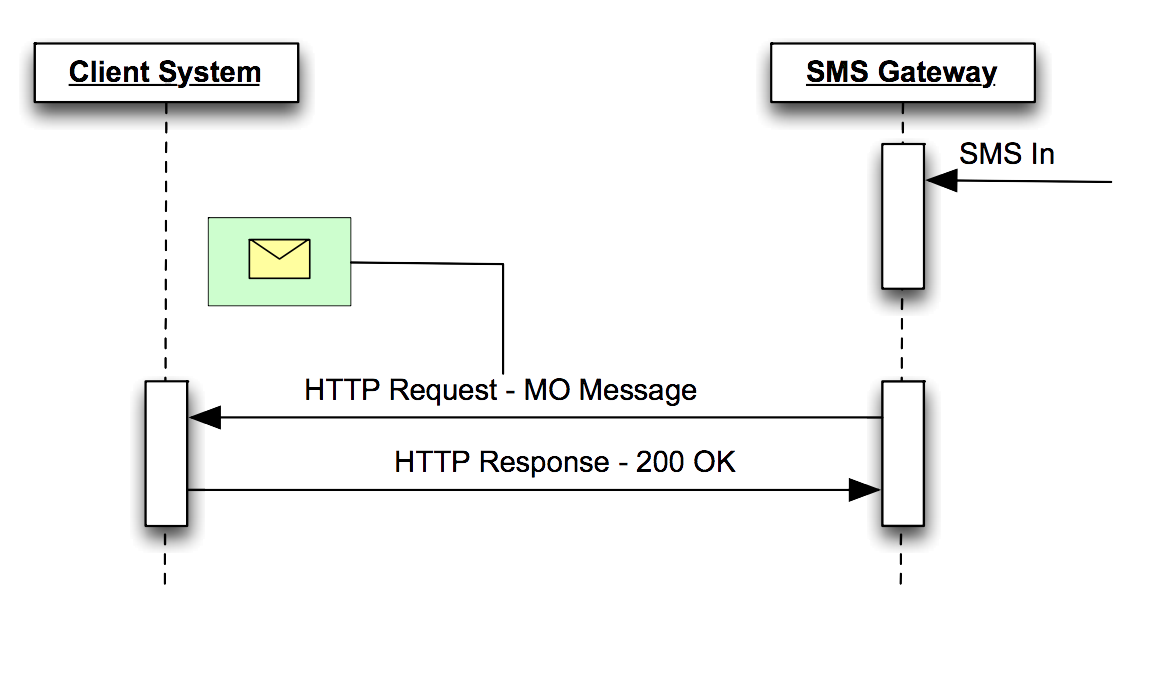
This interface allows your web site to receive messages from any mobile phone. This is known as a Mobile Phone Originated (MO) message. A correctly configured page on your web site must be set up to receive messages of this type.
**The process for receiving an SMS message is as follows:**
The SMS Gateway sends an HTTP GET request to your application containing the parameters described in section.
### **Message Parameters MO receive**
Your application confirms receiving MO message by responding with the character “0” (zero).
{% hint style="info" %}
Want to see an Example MO API call? [Click here](/use-cases/receive-sms-via-http-mo-example)
{% endhint %}
Receive MO message via HTTP message flow diagram
# Send SMS via HTTP (MT) Example
This document will go over executing API calls and provide examples.
### `GET` `/srs/api/sendsms`
Send a customisable SMS message to a MSISDN.
{% hint style="info" %}
Please note you must URL encode the MESSAGE\_TEXT parameter and VALUE must be set to 0 for a free message.
{% endhint %}
{% tabs %}
{% tab title="Curl" %}
```hsts
curl -X GET -H "Content-type: application/json" 'https://hostname/srs/api/sendsms?USER_NAME=&PASSWORD=&ORIGINATOR=&RECIPIENT=&PROVIDER=&KEYWORD=&MESSAGE_TEXT=Hello%20There!&VALUE=0'
```
{% endtab %}
{% tab title="Python" %}
```python
import requests
headers = {
'Content-type': 'application/json',
}
data = 'USER_NAME=&PASSWORD=&ORIGINATOR=&RECIPIENT=&PROVIDER=&KEYWORD=&MESSAGE_TEXT=Hello%20There!&VALUE=0'
response = requests.get('http://hostname/srs/api/sendsms', headers=headers, data=data)
```
{% endtab %}
{% endtabs %}
**Headers**
| Name | Value |
| ------------- | ------------------ |
| Content-Type | `application/json` |
| Authorization | `No Auth` |
**Body**
| Parameter | Type | Example | Description |
| ------------- | ------- | -------------------------------- | ------------------------------------------------- |
| account\_id | string | 43e36f50aaf111e272639171000000a9 | Your unique Mobivate account id. |
| password | string | 3b41d767316541bacef19d1382ac1e12 | Your unique associated Mobivate account api-key. |
| originator | integer | 12345 | The associated shortcode for your service. |
| recipient | integer | XX7432104492 | The recipient you want to send this message to. |
| provider | string | Safaricom | The network you plan to send the SMS message via. |
| keyword | string | mv-100620006 | Your unique Mobivate keyword for your service. |
| message\_text | string | Hello%20There! | The body of the text message you want to send. |
| value | integer | 10 | The cost of receiving this SMS message. |
**Response**
{% tabs %}
{% tab title="200" %}
```json
{
"MT-aabbccddeeff00112233445566778899"
}
```
{% endtab %}
{% tab title="511" %}
```json
{
"error": "Username or Password incorrect"
}
```
{% endtab %}
{% endtabs %}
{% hint style="warning" %}
Be aware for Premium SMS the cost must be set or the Short code's default value will be charged.
{% endhint %}
# Receive SMS via HTTP (MO) Example
This document will show you how to receive a SMS message (MO).
### `GET` `/yoursite.com.au/`
When an SMS MO message arrives at the SMS Gateway, it will send the following request to your application.
#### Example
#### Body
| Parameter | Type | Example | Description |
| ------------- | ------- | ------------- | ------------------------------------------------- |
| originator | integer | 12345 | The associated shortcode for your service. |
| recipient | integer | XX7432104492 | The recipient you want to send this message to. |
| provider | string | Telstra | The network you plan to send the SMS message via. |
| message\_text | string | Hello%20There | Your URL encoded message. |
| keyword | string | mv-100620006 | Your unique Mobivate keyword for your service. |
#### Output
```json
{
"ORIGINATOR": "61412345678",
"RECIPIENT": "1987654",
"PROVIDER": "telstra",
"MESSAGE_TEXT": "Hello%20There",
"KEYWORD": ""
}
```
#### Acknowledging MO's
For your endpoint to acknowledge MO's correctly your server needs to respond with a HTTP 200, and a body of either: “0” (ZERO), "OK" or "SUCCESS". To read more about this and see examples, [click here.](/use-cases/acknowledging-mos-and-drs)
{% hint style="warning" %}
You need to provide us with the MO destination (URL) before we can provide you with an account credentials. Please contact your account manager.
{% endhint %}
# Send Silent OBS Billing Message Example
This document will go over how to send silent OBS Billing Message via HTTP (MT).
### `GET` `/srs/api/sendsms`
Send a silent OBS billing message and charge your end-user for it.
{% hint style="warning" %}
This may not be available due to network regulations. For example, MTN hand their own billing requests.
{% endhint %}
{% tabs %}
{% tab title="Curl" %}
```hsts
curl -XGET -H "Content-type: application/json" 'https://hostname/srs/api/sendsms?USER_NAME=&PASSWORD=&ORIGINATOR=&RECIPIENT=&PR OVIDER=&VALUE=&KEYWORD=&MESSAGE_TEXT=SILENT%20BILLING%20MESSAGE'
```
{% endtab %}
{% tab title="Python" %}
```python
import requests
headers = {
'Content-type': 'application/json',
}
response = requests.get(
'https://hostname/srs/api/sendsms?USER_NAME=&PASSWORD=&ORIGINATOR=&RECIPIENT=&PR OVIDER=&VALUE=&KEYWORD=&MESSAGE_TEXT=SILENT%20BILLING%20MESSAGE',
headers=headers,
)
```
{% endtab %}
{% endtabs %}
**Headers**
| Name | Value |
| ------------- | ------------------ |
| Content-Type | `application/json` |
| Authorization | `No Auth` |
**Body**
| Parameter | Type | Example | Description |
| ------------- | ------- | -------------------------------- | ------------------------------------------------------------- |
| account\_id | string | 43e36f50aaf111e272639171000000a9 | Your unique Mobivate account id. |
| password | string | 3b41d767316541bacef19d1382ac1e12 | Your unique associated Mobivate account api-key. |
| originator | integer | 12345 | The associated shortcode for your service. |
| recipient | integer | XX7432104492 | The recipient you want to send this message to. |
| provider | string | Safaricom | The network you plan to send the SMS message via. |
| keyword | string | mv-100620006 | Your unique Mobivate keyword for your service. |
| message\_text | string | SILENT%20BILLING%20MESSAGE | Should be Silent Billing Message, end user will not see this. |
| value | integer | 10 | The cost of receiving this SMS message. |
**Response**
{% tabs %}
{% tab title="200" %}
```json
{
"MT-aabbccddeeff00112233445566778899"
}
```
{% endtab %}
{% tab title="511" %}
```json
{
"error": "Username or Password incorrect"
}
```
{% endtab %}
{% endtabs %}
# Unsubscribe VIA MT Unsubscribe Notification
This document will go over how to unsubscribe a user via an MT message.
### `GET` `/srs/api/sendsms`
Manually unsubscribe a user from your service using our API by using an unsubscription notification.
{% tabs %}
{% tab title="Curl" %}
```hsts
curl -XGET -H "Content-type: application/json" 'https:hostname/srs/api/sendsms?USER_NAME=&PASSWORD=&ORIGINATOR=&RECIPIENT=&PROVIDER=&MESSAGE_TEXT=&KEYWORD=&STARTED=+STOP&CLASS=PAUSE'
```
{% endtab %}
{% tab title="Python" %}
```python
import requests
headers = {
'Content-type': 'application/json',
}
response = requests.get(
'http://https:hostname/srs/api/sendsms?USER_NAME=&PASSWORD=&ORIGINATOR=&RECIPIENT=&PROVIDER=&MESSAGE_TEXT=&KEYWORD=&STARTED=+STOP&CLASS=PAUSE',
headers=headers,
)
```
{% endtab %}
{% endtabs %}
{% hint style="info" %}
When calling the Unsubscribe API, **+STOP** needs to be added also to indicate this is an unsubscription request.
{% endhint %}
**Headers**
| Name | Value |
| ------------- | ------------------ |
| Content-Type | `application/json` |
| Authorization | `No Auth` |
**Body**
| Parameter | Type | Example | Description |
| ------------- | ------- | -------------------------------- | ------------------------------------------------- |
| account\_id | string | 43e36f50aaf111e272639171000000a9 | Your unique Mobivate account id. |
| password | string | 3b41d767316541bacef19d1382ac1e12 | Your unique associated Mobivate account api-key. |
| originator | integer | 12345 | The associated shortcode for your service. |
| recipient | integer | XX7432104492 | The recipient you want to send this message to. |
| provider | string | Safaricom | The network you plan to send the SMS message via. |
| message\_text | string | YOU%20HAVE%20UNSUBSCRIBED | Your URL encoded message. |
| started | string | 2023-09-13 11:01 | The date/timestamp of when your message was sent. |
| keyword | string | mv-100620006 | Your unique Mobivate keyword for your service. |
| class | string | PAUSE | The class of the message, in this case PAUSE. |
**Response**
{% tabs %}
{% tab title="200" %}
```json
{
"MT-aabbccddeeff00112233445566778899"
}
```
{% endtab %}
{% tab title="511" %}
```json
{
"error": "Username or Password incorrect"
}
```
{% endtab %}
{% endtabs %}
# Receive Delivery Receipt via HTTP (DR)
Learn how to receive delivery receipts to your endpoint.
### `GET` `/yoursite.com.au/`
When a DR (Delivery receipt) arrives at our SMS Gateway, it will send the following request to your application.
#### Example
#### Body
| Parameter | Type | Example | Description |
| ------------- | ------- | -------------------------------- | ------------------------------------------------- |
| originator | integer | 12345 | The associated shortcode for your service. |
| recipient | integer | XX7432104492 | The recipient you want to send this message to. |
| provider | string | Telstra | The network you plan to send the SMS message via. |
| value | integer | 20 | The cost of the message. |
| message\_text | string | Hello%20There | Your URL encoded message. |
| id | string | 939ec52e333fbf124a87845d3a5d72e1 | Your unique message ID. |
| reference | string | ABC123 | Your own message reference. |
| result | string | SUCCESS | Indicates the result of the message. |
#### Output
```json
{
"ORIGINATOR": "61412345678",
"RECIPIENT": "1987654",
"PROVIDER": "telstra",
"VALUE": "20",
"MESSAGE_TEXT": "Hello%20There",
"ID": "939ec52e333fbf124a87845d3a5d72e1",
"REFERENCE": "ABC123",
"RESULT": "SUCCESS"
}
```
{% hint style="warning" %}
If you would like to receive Delivery Receipts, you need to provide us with the Delivery Receipt destination (URL). Please contact your account manager.
{% endhint %}
# Acknowledging MO's and DR's
Learn how to acknowledge if a MO or DR has been received successfully.
Upon receiving the MO / DR notification, your server needs to respond with a HTTP 200, and a body of either: “0” (ZERO), "OK" or "SUCCESS".
| Response Status Code | Body | Result |
| -------------------- | --------- | ------- |
| HTTP 200 | "0" | 0 |
| HTTP 200 | "OK" | OK |
| HTTP 200 | "SUCCESS" | SUCCESS |
{% tabs %}
{% tab title="Python" %}
```python
# Send HTTP 200 response with body "0"
return HttpResponse("0", status=200)
```
{% endtab %}
{% tab title="NodeJS" %}
```javascript
const express = require('express');
const app = express();
app.get('/', (req, res) => {
res.status(200).send('0');
});
```
{% endtab %}
{% endtabs %}
# Send A Premium SMS via HTTP (MT) Example
Learn how to send a Premium SMS MT message.
### `GET` `/srs/api/sendsms`
Send a Premium MT SMS message to a MSISDN.
{% tabs %}
{% tab title="Curl" %}
```hsts
curl -XGET -H "Content-type: application/json" 'https://hostname/srs/api/sendsms?USER_NAME=&PASSWORD=&ORIGINATOR=&RECIPIENT=&PROVIDER=&KEYWORD=&MESSAGE_TEXT=Hello%20There!&VALUE=&NETWORK='
```
{% endtab %}
{% tab title="Python" %}
```python
import requests
headers = {
'Content-type': 'application/json',
}
response = requests.get(
'https://hostname/srs/api/sendsms?USER_NAME=&PASSWORD=&ORIGINATOR=&RECIPIENT=&PROVIDER=&KEYWORD=&MESSAGE_TEXT=Hello%20There!&VALUE=&NETWORK=',
headers=headers,
)
```
{% endtab %}
{% endtabs %}
**Headers**
| Name | Value |
| ------------- | ------------------ |
| Content-Type | `application/json` |
| Authorization | `No Auth` |
**Body**
| Parameter | Type | Example | Description |
| ------------- | ------- | -------------------------------- | ------------------------------------------------- |
| account\_id | string | 43e36f50aaf111e272639171000000a9 | Your unique Mobivate account id. |
| password | string | 3b41d767316541bacef19d1382ac1e12 | Your unique associated Mobivate account api-key. |
| originator | integer | 12345 | The associated shortcode for your service. |
| recipient | integer | XX7432104492 | The recipient you want to send this message to. |
| provider | string | Safaricom | The network you plan to send the SMS message via. |
| keyword | string | mv-100620006 | Your unique Mobivate keyword for your service. |
| message\_text | string | Hello%20There! | The body of the text message you want to send. |
| value | integer | 10 | The cost of receiving this SMS message. |
**Response**
{% tabs %}
{% tab title="200" %}
```json
{
"MT-aabbccddeeff00112233445566778899p"
}
```
{% endtab %}
{% tab title="511" %}
```json
{
"error": "Username or Password incorrect"
}
```
{% endtab %}
{% endtabs %}
{% hint style="warning" %}
Be aware for Premium SMS the cost must be set or the Short code's default value will be charged.
{% endhint %}
# Vodafone/Airtel Ghana Billing
Specific instructions when billing through Vodafone or Airtel Ghana.
### `GET` `/yourdomain`
Vodafone Ghana and Airtel have recently changed the flow of their billing. They now handle all billing confirmation; meaning the flow starts when a billing request comes in.
#### Example
```hsts
?ORIGINATOR=&KEYWORD=&MESSAGE_TEXT=MNO+BILLED%3A+SILENT+BILLING+MESSAGE&CHANGED=False&VALUE=&RCPT=2021-07-28T02%3A02%3A56.811855&RESULT=1&PROVIDER=vodafonegh&RECEIPTED=2021-07-28T02%3A02%3A56.811855&RECIPIENT=&ID=&SENT=2021-07-28T02%3A01%3A50
```
**Body**
| Parameter | Type | Example | Description |
| ------------- | ------- | ------------------------------------ | ------------------------------------------------------------- |
| originator | integer | 12345 | The associated shortcode for your service. |
| keyword | string | mv-100620006 | Your unqiue Mobivate keyword for your service. |
| message\_text | string | MNO+BILLED%3A+SILENT+BILLING+MESSAGE | Your URL encoded message. |
| changed | boolean | FALSE | Indicates whether or not the notification has been modified. |
| amount | integer | 0 | Cost of the message. |
| rcpt | string | 2021-07-28T02%3A02%3A56.811855 | URL encoded date timestamp of when the message was receipted. |
| result | integer | 1 | Indicates the result of the message. |
| receipted | string | 2021-07-28T02%3A02%3A56.811855 | URL encoded date timestamp of when the message was receipted. |
| recipient | integer | XX7432104492 | The recipient you want to send this message to. |
| id | string | 939ec52e333fbf124a87845d3a5d72e1 | Your unique message ID. |
| sent | string | 2021-07-28T02%3A02%3A56.811855 | URL encoded date timestamp of when this message was sent. |
**Output**
```json
{
"ORIGINATOR": "61412345678",
"KEYWORD": "mv-100620006",
"MESSAGE_TEXT": "MNO+BILLED%3A+SILENT+BILLING+MESSAGE",
"CHANGED": "False",
"AMOUNT": "0",
"RCPT": "2021-07-28T02%3A02%3A56.811855",
"RESULT": "1",
"RECEIPTED": "2021-07-28T02%3A02%3A56.811855",
"RECIPIENT": "1987654",
"ID": "939ec52e333fbf124a87845d3a5d72e1",
"SENT": "2021-07-28T02%3A01%3A50"
}
```
New Vodafone Ghana and Airtel billing diagram
The next step would be to send the content Via a free SMS using the [Send SMS via HTTP method](/use-cases/send-sms-via-http-mt-example) mentioned previously.
{% hint style="danger" %}
Please note the amount must be set to **0** or Vodafone will reject the message.
{% endhint %}
# API Message Parameters
The page will give you all required parameters for sending MT messages via HTTP.
When sending text SMS MT messages, the following parameters should be sent as part of the HTTP GET request:
Parameter
Required?
Description
USER_NAME/Account_ID
Yes
Username / Account_ID are interchangeable and will be provided to you by Mobivate
PASSWORD/API_Key
Yes
Password / API_Key are interchangeable and will be provided to you by Mobivate
ORIGINATOR
Yes
Phone number of the Originator / Sender of the message. Valid originator strings are:
• Numeric originators: Numbers starting with 614xxxxxxxx
• Shortcode originators: Numbers starting with 13, 18 or 19
• Alphanumeric originators: Up to 11 characters, where at least one of the 11 must be a letter (Alpha) For example:
• MYCOMPANY
• 44700000000
• 1300123
RECIPIENT
Yes
Phone number of the recipient (mobile phone) in international format (MSISDN) For example: 44700000000.
MESSAGE_TEXT
Yes
The SMS message to be delivered to the recipient. This field must be URL Encoded to ensure accurate interpretation of the message. For example:
• “&” à “%36”
• “ “ à “%20”
PROVIDER
No
Identifies the telco provider (Telstra/Optus…) for Premium SMS Messages only For standard SMS messages, the field value must set to DEFAULT or left blank. For example: Telstra
VALUE
No
Specifies the value of a Premium SMS message, in cents (this applies to all currencies). To be used only in conjunction with the PROVIDER field. For example: 300 à $3.00 250 à $2.50
REFERENCE
No
Used by the sender to identify sent messages. Setting this field allows senders to easily track their messages For example: ABC123. Cannot be used for WEB Connections.
URL
No
When specified, the message will be sent as WAP Push. A link will appear on the handset showing the MESSAGE_TEXT parameter, and upon clicking the handset will be forwarded to the specified URL. This field must be URL Encoded. For example: http%3A%2F%2Fdomain.com%2Ffolder%2Fwap%2Ffile.wml
STARTED
Yes (In Kenya & South Africa)
Contains the date of when the Subscription first started (YYYY-MM-DD HH:MM:SS). To unsubscribe you also need to pass 'STOP' within this message parameter.
KEYWORD
Yes (In Kenya, South Africa, Ghana and UK)
Contains the product id (on the network side) to which the subscriber was subscribed. See Keyword Requirements below.
DR_ENDPOINT
No
The URL that the delivery notifications should be sent to for this message. We still suggest using a globaly defined DR endpoint. This one overrides it.
MESSAGE_CLASS
Yes
Declare the Message class. For unsubscription MT's this class is required to send unsubscription messages, ie. WELCOME MESSAGE, WELCOME CONTENT, CONTENT, STOP, PAUSE.
# Send BINARY SMS (MT) parameters
Learn how to send Binary SMS messages.
When sending *binary* SMS MT messages, in addition to the standard SMS MT message parameters, the following parameters should be sent as part of the HTTP GET request:
| Parameter | Required? | Description |
| ---------- | --------- | ----------------------------------- |
| **UDH** | Yes | OCTET Encoded User Data Header (UDH |
| **BINARY** | Yes | CTET Encoded binary data |
# Receive SMS (MO) parameters
Examples and documentation on how to receive MO's.
MO's should be returned to your MO endpoint in the following format:
```html
http://?ORIGINATOR=MSISDN&CAMPAIGN=&KEYWORD=&MESSAGE_TEXT=&REFERENCE=&PROVIDER=&RECIPIENT=
```
When receiving SMS MO messages, the following parameters will be sent as part of the HTTP GET request:
| Parameter | Description |
| ----------------- | --------------------------------------------------------------------------------------------------------------------------------------------------------------------------------------------------- |
| **ORIGINATOR** | Phone number of the originator (mobile phone) in international format (MSISDN) For example: `44700000000.` |
| **RECIPIENT** | Service code / Shortcode number of the recipient. |
| **MESSAGE\_TEXT** | The SMS message sent by the Originator. |
| **PROVIDER** | Identifies the telco provider (Telstra/Optus..)This field will be set to PREMIUM or left blank when receiving standard SMS messages For example: `Telstra.` |
| **REFERENCE** | The SMS Gateway will populate this parameter with our unique message identifier. Customers are encouraged to make sure no two messages are received with the same reference. For example: `ABC123.` |
| **VALUE** | Billing amount in the lowest denomination of the currency. If “0” then the MO's are to be considered free to the sender. |
| **KEYWORD** | If applicable, the product/service keyword identified by the MNO. |
| **CAMPAIGN** | If applicable, the product/service campaign identified by the MNO. |
# Subscription API (RESTFul)
This document will detail how to use our subscription API on our Gateway.
Subscription requests can be sent to our gateway via a ***HTTP POST*** API request to our endpoint:
```
https://subscription-api.mobivate.com/subscriptions///
```
Your unique subscription API can be be found under your campaign configuration screen under the **API URL** section.
#### Request Parameters
| Parameter | Description |
| ------------ | ------------------------------------------------------------------------------------------------------------------------------------------------------------------------------------------------------ |
| version | The version of the subscription api. Currently can only be `v1`. |
| campaign\_id | Your unique Mobivate campaign id, for example: `0000d000a000d000c000e0f000b00`. |
| method |
Which method you would like to call can be one of the following:
initiate, validate\_pin, unsubscribe,status or content.
|
#### JSON Parameters
When making this API request, you will need to also provide the following raw **JSON** parameters.
Copy
```
{
"msisdn":"xxxxxxxxxxx",
"keyword":"xxxxxxxx",
"signature":"xxxxxxxxxxxxxxxxxx"
}
```
| Parameter | Description |
| --------- | ----------------------------------------------------------------------------------------------------------------------------------------------- |
| msisdn | The unqiue msisdn for this request, **must** be in international format. |
| keyword | Name of the traffic source/unqiue Mobivate keyword. Required except for in the status method. |
| signature | Unique parameter consisting of three values: **campaign\_id**, **msisdn** and **account\_id**. For example: `1af289e14aa593c843da7cd869a8e2f7`. |
{% hint style="warning" %}
**Please note**: The Signature parameter uses standard MD5 hashing algorithm. You must convert this before making the request. An example of the MD5 hashing can be found below.
{% endhint %}
#### Signature Conversion
The Signature field needs to be converted using a standard MD5 hashing algorithm in order for your request to work. For example:
**account\_id:** `43e36f54eef111e270639871000000f1`
**campaign\_id:** `c71e2c2ee68b410a82d6c5f910c2d428`
**msisdn:** `254700000000`
When run through a standard MD5 hashing algorithm would become:
**MD5 hash:** `1af289e14aa593c843da7cd869a8e2f7`.
# Initiate Subscription (API)
This document will detail how to initiate a subscription via RESTFul api.
To initiate a subscription via our RESTFul API you must make the following **POST** request:
{% tabs %}
{% tab title="Request" %}
```hsts
https://subscription-api.mobivate.com/subscriptions/v1//initiate
```
{% endtab %}
{% tab title="JSON Body" %}
```json
{
"msisdn":"xxxxxxxxxxx"
"signature":"xxxxxxxxxxxxxxxxxx"
"keyword":"xxxxxxxx"
"pin":"1234"
}
```
{% endtab %}
{% endtabs %}
### Parameters
| Parameter | Description |
| --------- | ------------------------------------------------------------------------------------------------------------------------------------------------ |
| msisdn | The unique **MSISDN** you are trying to unsubscribe. |
| signature | Unique parameter consisting of three values: **campaign\_id**, **msisdn** and **account\_id**. For example: `1af289e14aa593c843da7cd869a8e2f7`. |
| keyword | Your unique Mobivate keyword. |
| pin | Your validated PIN code. For example: `12345`. |
### Successful response
If your initiate subscription was successful, you will receive a HTTP Status Code: 200:
```json
{
"authenticated" : True,
"valid_msisdn" : True,
"valid_campaign" : True,
"campaign_status" : "active",
"campaign_name" : "Test Campaign",
"campaign_service" : "12345",
"state" : "pending_pin",
"error" : Null,
"reference": "AP:aaaaaaa-bbbbbbbbb-cccccccc"
}
```
### Failed response
In case the campaign id is invalid or campaign is no longer available, the following status will be returned, HTTP Status Code: 404:
```json
{
"authenticated" : True,
"valid_msisdn" : True,
"valid_campaign" : False,
"campaign_status" : Null,
"campaign_name" : Null,
"campaign_service" : Null,
"state" : Null,
"error" : "CampaignID '...' not found!",
"reference": "AP:aaaaaaa-bbbbbbbbb-cccccccc"
}
```
### Additional parameters/User Information
When submitting the subscription **initiate response,** you can also submit additional information that you have obtained about the subscriber. Here is a list of some of the additional parameters you can submit:
| Parameter | Description |
| --------------- | ----------------------------------------- |
| first\_name | First Name |
| last\_name | Last Name |
| email | Valid Email Address |
| dob | Date of birth |
| ip | Valid IPv4 Address |
| handset | Device/Make/Model/ID |
| custom\_data | Any custom data in JSON format. Under 1kb |
| traffic\_source | A name/ID to identify this traffic source |
# Validate PIN (API)
This document will go over how to validate PIN codes using our RESTFul api.
After calling the **initiate** method via our API and receiving **pending\_pin** state in response, you are supposed to have user presented with a form where they can enter a numeric PIN code (5-6 digits). This is a **POST** request.
### Example request
{% tabs %}
{% tab title="Request" %}
```hsts
https://subscription-api.mobivate.com/subscriptions/v1//validate_pin
```
{% endtab %}
{% tab title="JSON Body" %}
```json
{
"msisdn":"xxxxxxxxxxx"
"signature":"xxxxxxxxxxxxxxxxxx"
"keyword":"xxxxxxxx"
"pin":"1234"
}
```
{% endtab %}
{% endtabs %}
### Parameters
| Parameter | Description |
| --------- | ------------------------------------------------------------------------------------------------------------------------------------------------ |
| msisdn | The unique **MSISDN** you are trying to unsubscribe. |
| signature | Unique parameter consisting of three values: **campaign\_id**, **msisdn** and **account\_id**. For example: `1af289e14aa593c843da7cd869a8e2f7`. |
| keyword | Your unique Mobivate keyword. |
| pin | Your validated PIN code. For example: `12345`. |
### Invalid PIN code response
Here is an example of an invalid PIN code response, this is your response if the user enters a random or incorrect PIN code, **HTTP Status Code 417**:
```json
{
"authenticated" : True,
"valid_msisdn" : True,
"valid_campaign" : True,
"campaign_status" : "active",
"campaign_name" : "Test Campaign",
"campaign_service" : "12345",
"state" : "pending_pin",
"error" : "Invalid PIN",
"reference": "AP:aaaaaaa-bbbbbbbbb-cccccccc"
}
```
{% hint style="info" %}
**Please note**: The PIN code is valid for a maximum of **10 attempt**s. After which the PIN will permanently expire and the process will have to be restarted.
{% endhint %}
### Expired PIN code response
Here is an example of an expired PIN code's response, **HTTP Status Code 440**:
```json
{
"authenticated" : True,
"valid_msisdn" : True,
"valid_campaign" : True,
"campaign_status" : "active",
"campaign_name" : "Test Campaign",
"campaign_service" : "12345",
"state" : "pending_pin",
"error" : "Maximum number of failed attempts! PIN is no longer existing!",
"reference": "AP:aaaaaaa-bbbbbbbbb-cccccccc"
}
```
### Successful response
If the user's PIN code is submitted successfully the following response can be expected, **HTTP Status Code 200**:
```json
{
"authenticated" : True,
"valid_msisdn" : True,
"valid_campaign" : True,
"campaign_status" : "active",
"campaign_name" : "Test Campaign",
"campaign_service" : "12345",
"state" : "subscribed",
"error" : Null,
"reference": "AP:aaaaaaa-bbbbbbbbb-cccccccc"
}
```
# Unsubscribing Users (API)
This document aims to detail how to unsubscribe users via our RESTFul api.
You can also unsubscribe your users via our RESTFul api with the following **POST** request:
{% tabs %}
{% tab title="Request" %}
```hsts
https://subscription-api.mobivate.com/subscriptions/v1//unsubscribe
```
{% endtab %}
{% tab title="JSON Body" %}
```json
{
"msisdn":"xxxxxxxxxxx"
"signature":"xxxxxxxxxxxxxxxxxx"
}
```
{% endtab %}
{% endtabs %}
### Parameters
| Parameter | Description |
| --------- | ------------------------------------------------------------------------------------------------------------------------------------------------ |
| msisdn | The unique **MSISDN** you are trying to unsubscribe. |
| signature | Unique parameter consisting of three values: **campaign\_id**, **msisdn** and **account\_id**. For example: `1af289e14aa593c843da7cd869a8e2f7`. |
{% hint style="info" %}
To read more about how to generate signatures, [click here](/api-message-paramaters/subscription-api-restful).
{% endhint %}
### Successful response
If your user has been unsubscribed successfully you will receive the following response, **HTTP Status Code 200**:
```json
{
"authenticated" : True,
"valid_msisdn" : True,
"valid_campaign" : True,
"campaign_status" : "active",
"campaign_name" : "Test Campaign",
"campaign_service" : "12345",
"state" : "unsubscribed",
"error" : Null,
"reference": "AP:aaaaaaa-bbbbbbbbb-cccccccc"
}
```
# Checking Subscription Status (API)
This document aims to detail how to check subscriptions status of subscribers.
You can also check your users subscription status via our RESTFul api with the following **POST** request:
{% tabs %}
{% tab title="Request" %}
```
https://subscription-api.mobivate.com/subscriptions/v1//status
```
{% endtab %}
{% tab title="JSON Body" %}
```json
{
"msisdn":"xxxxxxxxxxx"
"signature":"xxxxxxxxxxxxxxxxxx"
}
```
{% endtab %}
{% endtabs %}
### Parameters
The only parameter required for the request is the statuses you check.
| Parameter | Description |
| --------- | ------------------------------------------------------------------------------------------------------------------------------------------------ |
| status | The statuses you want to check, for example: `active`, `inactive`, `nf`, `nfi`, `ping`, `onhold`, `blocked`, r`einvite` and `doi-onhold` |
| msisdn | The unique **MSISDN** you are trying to unsubscribe. |
| signature | Unique parameter consisting of three values: **campaign\_id**, **msisdn** and **account\_id**. For example: `1af289e14aa593c843da7cd869a8e2f7`. |
{% hint style="info" %}
**Please note:** You can include multiple statuses in your request, for example: `'active', 'inactive'` etc.
{% endhint %}
### Successful response
If your user's status has been checked successfully you will receive the following response, **HTTP Status Code 200**:
```json
{
"authenticated" : True,
"valid_ " : True,
"valid_campaign" : True,
"campaign_status" : "active",
"campaign_name" : "Test Campaign",
"campaign_service" : "12345",
"state" : ('active','inactive','nf','nfi','ping','onhold','blocked','reinvite','doi-onhold',
'doi-declined','suspended','investigate','unsub'),
"error" : Null,
"reference": "AP:aaaaaaa-bbbbbbbbb-cccccccc"
}
```
# Sending Messages To Subscribers (API)
This document aims to detail how to send a message to your subscribers via RESTFul api.
You can send standard messages to your subscribers via our RESTful API by making the following **POST** request:
{% tabs %}
{% tab title="Request" %}
```hsts
https://subscription-api.mobivate.com/subscriptions/v1//message
```
{% endtab %}
{% tab title="JSON Data" %}
```json
{
"msisdn":"xxxxxxxxxxx"
"keyword":"xxxxxxxx"
"provider":"default"
"cost":"100"
"message":"Hello World"
"signature":"xxxxxxxxxxxxxxxxxx"
}
```
{% endtab %}
{% endtabs %}
### Parameters
The only parameter required for the request is the message you want to send your subscribers.
| Parameter | Description |
| --------- | ------------------------------------------------------------------------------------------------------------------------------------------------ |
| msisdn | The unique **MSISDN** you are trying to unsubscribe. |
| keyword | Your unique Mobivate keyword. |
| provider | Network provider to use for the message. Can be either `default` or `premium`. |
| cost | The cost of the message to your subscriber, for example: `100`. |
| message | Your message, for example: `Hello World!` |
| signature | Unique parameter consisting of three values: **campaign\_id**, **msisdn** and **account\_id**. For example: `1af289e14aa593c843da7cd869a8e2f7`. |
### Successful response
If your user has been sent a message successfully you will receive the following response, **HTTP Status Code 200**:
```json
{
"authenticated" : True,
"valid_msisdn" : True,
"valid_campaign" : True,
"campaign_status" : "active",
"campaign_name" : "Test Campaign",
"campaign_service" : "12345",
"state" : "queued"
"error" : Null,
"reference": "AP:aaaaaaa-bbbbbbbbb-cccccccc"
}
```
# Sending Content To Subscribers (API)
This document details how to send content/binary messages to your subscribers via RESTful api.
If you are using our content system you can also send your content directly to your subscribers via our RESTful api with the following **POST** request:
{% tabs %}
{% tab title="Request" %}
```hsts
https://subscription-api.mobivate.com/subscriptions/v1//content
```
{% endtab %}
{% tab title="JSON Body" %}
```json
{
"msisdn":"xxxxxxxxxxx"
"keyword":"xxxxxxxx"
"provider":"default"
"cost":"100"
"content":"1234567"
"method":"sms"
"signature":"xxxxxxxxxxxxxxxxxx"
}
```
{% endtab %}
{% endtabs %}
### Parameters
The only parameter you need to use in this api call is your content id as described below.
| Parameter | Description |
| --------- | ------------------------------------------------------------------------------------------------------------------------------------------------ |
| msisdn | The unique **MSISDN** you are trying to unsubscribe. |
| keyword | Your unique Mobivate keyword. |
| provider | Network provider to use for the message. Can be either `default` or `premium`. |
| cost | The cost of the message to your subscriber, for example: `100`. |
| content | The unique id for the content you want to send. For example: `1234567`. |
| method | The method of how users will access the content, can be either: `sms` or `url`. |
| signature | Unique parameter consisting of three values: **campaign\_id**, **msisdn** and **account\_id**. For example: `1af289e14aa593c843da7cd869a8e2f7`. |
### Successful response
If your user has been sent content successfully you will receive the following response, **HTTP Status Code 200**:
```json
{
"authenticated" : True,
"valid_msisdn" : True,
"valid_campaign" : True,
"campaign_status" : "active",
"campaign_name" : "Test Campaign",
"campaign_service" : "12345",
"state" : "queued"
"error" : Null,
"reference": "AP:aaaaaaa-bbbbbbbbb-cccccccc"
}
```
# Content API (RESTFul)
This document will detail how to use our content API on our Gateway.
To pull content information from the our content Portal you can use Mobivate's Content API (RESTful).
This means that by making few simple HTTP GET Requests, you can retrieve the content information, including the images and record it on your own site for faster content retrieval while keeping your website content up-to-date.
### API Requests
For all requests to Content API, make the HTTP GET request to:
```hsts
https://content-api.mobivate.com///
```
### Responses
We understand some programmers have preference of retrieving responses in XML while others may prefer JSON format. So, we offer both.
You can request the format you prefer in two ways:
By specifying the ''`Accepts: application-json`'' / ''`Accepts: application-xml`'' in the request or, by adding the ''`format=(json | xml)`'' parameter in the URL request string.
### Example Request
```gettext
GET https://content-api.mobivate.com/v1/aaaaaabbbbbbcccccc/content_types/
```
### Example Response
```xml
Android AppsCover Full TracksCovertonesGamesJ2MEMonophonicsPolyphonicsTrue Full TracksTrueSoundsTrueTonesVideosWallpapers
```
### Parameters
Below are a list of parameters used for the content api requests:
| Parameter | Description |
| ----------- | ---------------------------------------------------------------------------------------------------------------------------------------------------------------------------------------------------- |
| version | The version of the subscription api. Currently can only be `v1`. |
| account\_id | Your unique Mobivate account id, for example: `0000d000a000d000c000e0f000b00`. |
| method |
Which method you would like to call can be one of the following: content\_types,
categories, search, latest or item.
|
# Content Types (API)
This document aims to detail how to request content types via our RESTFul api.
To get a list of all available content types on your account you can make the following **GET** request:
```
https://content-api.mobivate.com/v1//content_types
```
### Successful XML Response
```xml
Android AppsCover Full TracksCovertonesGamesJ2MEMonophonicsPolyphonicsTrue Full TracksTrueSoundsTrueTonesVideosWallpapers
```
# Content Categories (API)
This document aims to detail how to request content categories via our RESTFul api.
To list all available categories available to your account you can make the following **GET** request:
```hsts
https://content-api.mobivate.com/v1//categories/?types=Games,Videos
```
### Parameters
| Parameter | Description |
| ----------- | ------------------------------------------------------------------------------ |
| account\_id | Your unique Mobivate account id, for example: `0000d000a000d000c000e0f000b00`. |
| types | The specified type of categories available on your account. |
{% hint style="info" %}
Please note: You can specify multiple content types by separating them by a comma. For example: `Games,Videos`
{% endhint %}
# Search Content (API)
This document aims to detail how to search content via RESTFul api.
To list all available categories available to your account you can make the following **GET** request:
```hsts
https://content-api.mobivate.com/v1//item/search/<**offset=0**><**limit=100**>/?search<>=---:---:---:---&search<>
```
The URL consists of two optional parameters ''offset'' and ''limit''. Incrementing ''offset'' (by multiples of limit) will return the next page of results. Increasing the ''limit'' will return more results in each query.
A search query has FOUR parts. Parts are separated by a semi-colon `'':''`. Any part of the query can be replaced with a `''*''` to use a wild-card in that place.
### Examples
```hsts
GET https://content-api.mobivate.com/v1/[ACCOUNT_ID]/item/search/0/100?
search[]=*:*:*:*'
```
By posting the query '`'search[]=–:–:–:–''` you can search for the specific `''content_type'':''category'':''artist'':''title''` (in this specific order!) `''artist''` and `''title''` use wild-cards so by entering `''"on"''` in place of `''artist'`', you are searching for all artists containing letters 'on' anywhere in their name. (ie. Bey**on**ce, 'M**on**a Lisa'). For example:
```
''...?search[]=Games:Sports:*:ball&search[]=Videos:Funny:*:*''
```
{% hint style="info" %}
**Please note:** You can search multiple queries in a single request.
{% endhint %}
The query above can be interpreted as:
* Any item in of type Games and in category "Sports" containing "ball" anywhere in the title.
* And, All Video Items in category "Funny".
# Latest Content Items (API)
This page aims to document how to
To get the latest added content items you can make the following **GET** request:
```hsts
https://content-api.mobivate.com/v1//latest/
```
### Parameters
| Parameter | Description |
| ----------- | ------------------------------------------------------------------------------ |
| account\_id | Your unique Mobivate account id, for example: `0000d000a000d000c000e0f000b00`. |
| start\_date | The specified start date of your query, for example: `01/01/2024`. |
### Example
```hsts
https://content-api.mobivate.com/v1/aaaaaabbbbbbcccccc/latest/2014-07-01
```
# Content Items (API)
This document aims to detail how to get content items via our RESTFul API.
You can retrieve specific content items available to your account by making the following **GET** request:
```
https://content-api.mobivate.com/v1//item/
```
### Parameters
| Parameter | Description |
| ----------- | ------------------------------------------------------------------------------ |
| account\_id | Your unique Mobivate account id, for example: `0000d000a000d000c000e0f000b00`. |
| code | Your unique content code. For example: `1234567`. |
### Successful Response
```json
{
category: "Content Category",
uploaded: "2008-06-16 14:43:38",
file_preview: "https://content.mobivate.com/file/preview/1234567/",
supplierID: "21",
artist: "Content Artist",
title: "Content Type",
CODE: "1234567",
adult: "No",
short_description: "",
type: "Content Type",
compatibility: "None"
}
```
{% hint style="info" %}
**Please note:** You should fetch any **file\_preview** items available for download and store them locally as it's usually fastest possible option for the website to load.
{% endhint %}
# Network Double Opt-in (NDOI)
Learn how to handle an NDOI request using our API.
### `GET` `/api/doi///`
Initiate a network DOI subscription.
{% tabs %}
{% tab title="Curl" %}
```hsts
curl -XGET -H "Content-type: application/json" 'https://hostname/api/doi///?source=&destination=&keyword=&frequency=7&amount=100&campaign=Test&provider=&reference='
```
{% endtab %}
{% tab title="Python" %}
```python
import requests
headers = {
'Content-type': 'application/json',
}
response = requests.get(
'https://hostname/api/doi///?source=&destination=&keyword=&frequency=7&amount=100&campaign=Test&provider=&reference=',
headers=headers,
)
```
{% endtab %}
{% endtabs %}
**Headers**
| Name | Value |
| ------------- | ------------------ |
| Content-Type | `application/json` |
| Authorization | `No Auth` |
**Required Body**
| Parameter | Type | Example | Description |
| ----------- | ------- | -------------------------------- | ----------------------------------------------------- |
| account\_id | string | 43e36f50aaf111e272639171000000a9 | Your unique Mobivate account id. |
| api\_key | string | 3b41d767316541bacef19d1382ac1e12 | Your unique associated Mobivate account api-key. |
| source | integer | 12345 | The associated shortcode for your service. |
| destination | integer | XX7432104492 | The recipient you want to send this message to. |
| keyword | string | mv-100620006 | Your unique Mobivate keyword for your service. |
| amount | integer | 10 | The amount your message will be billed for receiving. |
| reference | string | ABC1234 | Your internal unique reference. |
| provider | string | safaricom | The network provider this message will be sent via. |
**Optional Body**
| Parameter | Type | Example | Description |
| --------- | ------- | -------------------------------- | ----------------------------------------------------------- |
| campaign | string | 87e36f50aaf113e272629971000000a3 | Your unique Mobivate campaign id. |
| frequency | integer | 7 | Billing frequency, in this case 7 is weekly. |
| stop | string | stop | To indicate a user is being unsubscribed from your service. |
**Response**
{% tabs %}
{% tab title="200" %}
```json
{
"200": "MT-c65561314eb34088b6df42d8241aace0"
}
```
{% endtab %}
{% tab title="541" %}
```json
{
"error": "541"
}
```
{% endtab %}
{% endtabs %}
### Asynchronous Final Notification
Asynchronous final notification will be delivered to your standard DR Path with codes:
Code
Description
Your action
540
DOI Confirmed by user
Continue with the subscription (ie. send welcome messages and content)
541
Message delayed while waiting for DOI
Existing NDOI exists. Please hold before retrying
542
Message rejected due to DOI
The user has not confirmed the NDOI yet. Please wait before retrying.
543
DOI Unconfirmed / Awaiting user action
The user has not confirmed the NDOI yet. Please wait before retrying.
544
DOI Declined by user
The user declined NDOI. You should wait for the user to initiate a request again.
545
DOI Failed
Network DOI failed. Try again or contact Mobivate support to investigate further.
{% hint style="info" %}
For a full list of response codes, please [click here](https://gateway.mobivate.com/response_codes/).
{% endhint %}
# Network Double Opt-in (NDOI) Unsubscribe
Learn how to handle an NDOI request using our API.
### `GET` `/api/doi///`
Initiate a network DOI unsubscription request.
{% tabs %}
{% tab title="Curl" %}
```hsts
curl -XGET -H "Content-type: application/json" 'https://hostname/api/doi///?source=&destination=&keyword=&frequency=7&amount=100&campaign=Test&provider=&reference=&stop'
```
{% endtab %}
{% tab title="Python" %}
```python
import requests
headers = {
'Content-type': 'application/json',
}
response = requests.get(
'https://hostname/api/doi///?source=&destination=&keyword=&frequency=7&amount=100&campaign=Test&provider=&reference=&stop',
headers=headers,
)
```
{% endtab %}
{% endtabs %}
**Headers**
| Name | Value |
| ------------- | ------------------ |
| Content-Type | `application/json` |
| Authorization | `No Auth` |
**Required Body**
| Parameter | Type | Example | Description |
| ----------- | ------- | -------------------------------- | ----------------------------------------------------------- |
| account\_id | string | 43e36f50aaf111e272639171000000a9 | Your unique Mobivate account id. |
| api\_key | string | 3b41d767316541bacef19d1382ac1e12 | Your unique associated Mobivate account api-key. |
| source | integer | 12345 | The associated shortcode for your service. |
| destination | integer | XX7432104492 | The recipient you want to send this message to. |
| keyword | string | mv-100620006 | Your unique Mobivate keyword for your service. |
| amount | integer | 10 | The amount your message will be billed for receiving. |
| reference | string | ABC1234 | Your internal unique reference. |
| provider | string | safaricom | The network provider this message will be sent via. |
| stop | string | stop | To indicate a user is being unsubscribed from your service. |
**Response**
{% tabs %}
{% tab title="200" %}
```json
{
"200": "MT-c65561314eb34088b6df42d8241aace0"
}
```
{% endtab %}
{% tab title="541" %}
```json
{
"error": "541"
}
```
{% endtab %}
{% endtabs %}
{% hint style="info" %}
For a full list of response codes, please [click here](https://gateway.mobivate.com/response_codes/).
{% endhint %}
# NDOI Keyword Patterns per country
Learn all about the Keyword patterns per country for NDOI requests.
You must submit the **keyword** parameter with each of your requests. These keyword patters depend on the country. You should maintain an up-to-date list of your provisioned keywords. You can get the updated list at any time from your account manager.
Country
Format
Pattern
Example
South Africa
{ServiceID}
([a-z0-9]+)
43292zpz58124
Kenya
{ProductID}:{ServiceID}
([a-z0-9]+):([0-9]+)
MDSP2000060241:6013442000004456
Ghana
{Keyword}:{ServiceID}
([a-z0-9]+):([0-9]+)
games:23301220000010596
{% hint style="warning" %}
If you do not submit the Keyword parameter in your request in the correct format it will fail
{% endhint %}
# MNO Web Opt-in Introduction
Learn about MNO single click Web Opt-In.
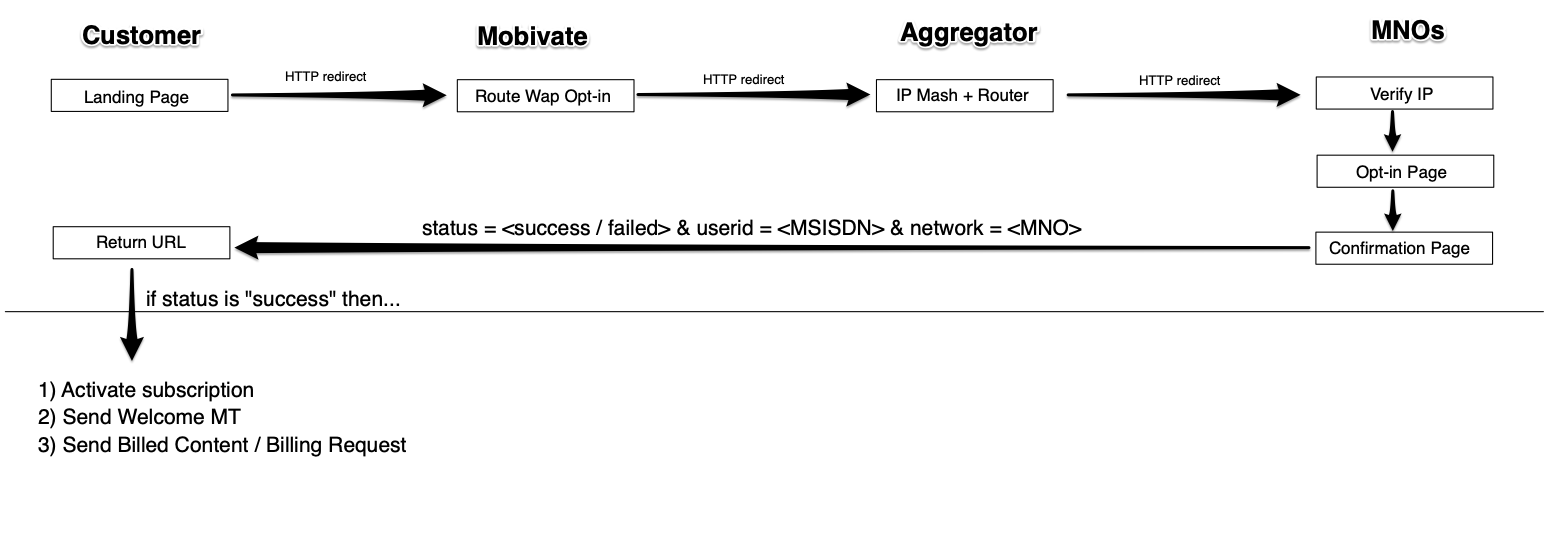
Web Opt-in is practically a single-click opt-in, but it will ONLY work if the user is browsing via his/her mobile device while connected to the MNOs Mobile Data.
{% hint style="warning" %}
Web Opt-In will **NOT** work if the user is connected to the WiFi
{% endhint %}
Web Opt-In flow diagram
{% hint style="info" %}
Mobivate currently provides the MNO Web Opt-In in the following regions:
[South Africa](/mno-web-opt-in/mno-web-opt-in-south-africa)
[Nigeria](/mno-web-opt-in/mno-web-opt-in-nigeria)
[Kenya](/mno-web-opt-in/mno-web-opt-in-kenya)
{% endhint %}
# MNO Web Opt-In South Africa
This document describes MNO Web Opt-In for SA.
### `GET` `/lookup/za/`
Opt-In users via MNO Web-Opt-In.
Redirect the user to the Lookup URL. Once the lookup is performed, user will be sent back to your *Return URL*. Upon the return the user will already be subscribed to your service and you can start sending billed messages, but only if the `status` variable is `success`.
{% tabs %}
{% tab title="Curl" %}
```hsts
curl -XGET -H "Content-type: application/json" 'https:///lookup/za/?shortcode=&service==&freq=&campaign=&amount=&bl=&bc=&tc=&return='
```
{% endtab %}
{% tab title="Python" %}
```python
import requests
headers = {
'Content-type': 'application/json',
}
response = requests.get(
'https:///lookup/za/?shortcode=&service==&freq=&campaign=&amount=&bl=&bc=&tc=&return=',
headers=headers,
)
```
{% endtab %}
{% endtabs %}
**Headers**
| Name | Value |
| ------------- | ------------------ |
| Content-Type | `application/json` |
| Authorization | `No Auth` |
**Body**
| Name | Type | Example | Description |
| --------- | ------- | ------------------------------------------------------- | ------------------------------------------------------------------------------------------ |
| shortcode | string | 30000 | The shortcode associated with your service. |
| service | string | apple=aaaabbbbcccccddddd | Your unique Mobivate Keyword and the Product ID. |
| frequency | string | 1-7,31 | Billing frequency, `1`-`7` messages per week, or if `31` then it's single monthly billing. |
| campaign | string | My Campaign | Your internal campaign description. |
| amount | integer | 10 | Amound of Rand (ZAR) billed per billing request. |
| bl | string | [http://yourdomain/logo.pn](http://yourdomain/logo.png) | Full URL to your Header Image. |
| bc | string | ffffff | HEX value for the background colour. |
| tc | string | 000000 | HEX value for the text colour. |
| return | string | | Your return URL. |
#### Response
{% tabs %}
{% tab title="200" %}
```json
{
"status": "success",
"message": "Successful subscription",
"userid": "44700000000",
"network": "safaricom"
}
```
{% endtab %}
{% tab title="400" %}
```json
{
"error": "Invalid request"
}
```
{% endtab %}
{% endtabs %}
#### Output fields
| Parameter | Description |
| --------- | ------------------------------------------------------- |
| status | MNO subscription status, either `success` or `failed`. |
| message | Any message passed through from the MNO. |
| userid | If the MSISDN was detected, the fully qualified MSISDN. |
| network | MNO identifier. |
# MNO Web Opt-In Kenya
This document describes MNO Web Opt-In for KE.
For Kenya, Mobivate offers a few different Flows that cater to our customers needs for traffic/marketing.
At present, we have 3 different flows: **ZeroD, Paidweb** and **SecureD**.
### Paidweb and ZeroD
**Flow**: The user lands on your landing page where we will generate a unique **trxID** for the user and perform a **header enrichment lookup**. Once the lookup is performed we will obtain the **hashed MSIDIN** for that user.
The landing page will then redirect the user to subscription confirmation page where the user must consent to subscribing to the service. Following successful consent and MSISDN verification, the user will be redirected to your content URL and will receive a confirmation SMS message of successful subscription to your service.
The returned user will already be subscribed to your service and you can start sending billed messages.
### SecureD
**Flow:** Is almost identical the **Paidweb** and **ZeroD** but with one difference, **SecureD** allows you to manage and provide your own marketing traffic. With this in mind, the flow differs slightly as you will need to generate a **trxID** on your server and redirect your users to a subscription URL that Mobivate provides you with. To learn more about the **SecureD** technical integration you can read our guide [here](/mno-web-opt-in/mno-web-opt-in-kenya/subscribing-users-to-your-service#secured-subscriptions).
# Configuring your campaign
This document will teach you how to configure your campaign on the MobiPay portal.
In order to complete Web Opt-In for Kenya, you'll need to configure your campaign on our MobiPay Portal.
{% hint style="info" %}
To start you need to modify or create your campaign [here](https://subscription.mobivate.com/campaigns).
{% endhint %}
Alternatively navigate to our **Subscription Portal** and click the **Manage Campaigns** button.
Campaign management screen
Click Edit to modify your campaign, or you can click the Create button to create your campaign.
### Configuring your Content Delivery / Billing Frequencies
In our Portal, you have complete customization over your content delivery and billing frequencies.
Content Delivery schedule
This allows you to configure when you bill your users for access to your content and at what price.
### Configuring Re-billing Frequencies
Once you have setup an initial time to bill your customers, we would suggest also setting up rebilling requests. These requests allow you to attempt to bill any customers who have not yet been successfully billed for the day.
This can be configured under the Rebilling menu.
In this case, I am attemtping to rebill my users the 1 hour from my initial billing request above
### Opt-In Configuration
Is an important part of your campaign's overall configuration as it keeps track of the subscriptions through our system.
The Opt-In Configuration screen
Upon working with Mobivate you will receive a unique keyword or multiple keywords depending on which flows you intend to use. These must be entered here and will look like the following:
```
mv-1000000001200 OR secured=mv-1000000001200
```
{% hint style="info" %}
To get your unique keywords, please contact your **account manager**.
{% endhint %}
### Event Actions
This section is used to configure your free welcome messages to your customer alongside the technical configuration of your callbacks.
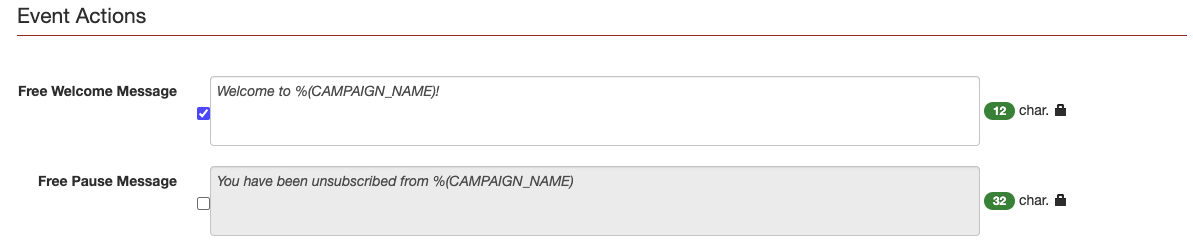
Event actions screen
In the **Free Welcome Message** and **Free Pause Message** sections, you can dynamically set messages that your users will receive for Subscribing and Unsubscribing to your service. These can also be toggled on and off using the tickboxes.
### Receiving callbacks in your endpoints
### Successful subscription callbacks
To configure your campaign to post successful subscription callbacks, you will need to include the rule: **On Subscription Hit URL** under your event actions.
An example Subscription callback configuration
### Example request
```markup
https:///callbacks/ke/safaricom/?action=subscribed&user=%(MSISDN)&keyword=%(KEYWORD)&service=%(SERVICE)
```
This example request will send the following parameters to your configured endpoint: `action=subscribed`, `user=msisdn`, `keyword=keyword` and `service=service`.
### Successful unsubscription callbacks
To configure your campaign to post successful subscription callbacks, you will need to include the rule: **On Pause (user sent STOP, subscription changed to Inactive) Hit URL** under your event actions.
An example Unsubscription callback configuration
### Example request
```markup
https:///callbacks/ke/safaricom/?action=unsubscribed&user=%(MSISDN)&keyword=%(KEYWORD)&service=%(SERVICE)
```
This example request will send the following parameters to your configured endpoint: `action=unsubscribed`, `user=msisdn`, `keyword=keyword` and `service=service`.
### Successful billed callbacks
To configure your campaign to post successful subscription callbacks, you will need to include the rule: **On every positive DLRs hit url** under your event actions.
An example billing callback configuration
### Example request
```markup
https:///callbacks/ke/safaricom/?action=billing&user=%(MSISDN)&keyword=%(KEYWORD)&service=%(SERVICE)&cost=%(COST)
```
This example request will send the following parameters to your configured endpoint: `action=billing`, `user=msisdn`, `keyword=keyword,` `service=service` and `cost=cost`.
To differentiate between **billing requests** and **re-billing requests** you can check the cost field as this will be set at different values.
{% hint style="info" %}
To understand callback parameters and to see all available parameters, read [our guide here](broken://pages/5uuJ9nzt0TijtkD9UGzf).
{% endhint %}
# Subscribing users to your service
This document describes how to subscribe users to your service.
As Mobivate offers our users multiple flows through Kenya. The subscription process will slightly differ depending on your selected flow.
### Paidweb or ZeroD Subscriptions
If you are using either our **Paidweb** or **ZeroD** flow then Mobivate will handle the subscriptions and send you a notification upon successful subscription. To configure your subscriptions endpoint notifications, please read our campaign configuration documents [here](/mno-web-opt-in/mno-web-opt-in-kenya/configuring-your-campaign).
### SecureD Subscriptions
Our **SecureD** flow differs slightly from **Paidweb** and **ZeroD** because it allows our users to handle their own marketing and traffic. The Flow for our **SecureD** can be viewed and explained here.
If you are using our **SecureD** flow there are a few additional technical changes that must be made on your side depending on the fraud-prevention provider you intended to use.
If you are interested in using Upstream, please read our guide [here](/mno-web-opt-in/mno-web-opt-in-kenya/subscribing-users-to-your-service/subscribing-users-via-upstream). Alternatively if you are interested in using Scienlabs, click [here](/mno-web-opt-in/mno-web-opt-in-kenya/subscribing-users-to-your-service/subscribing-users-via-scienlabs) to read our guide.
# Subscribing users via Upstream
This page documents subscribing users to your service if your landing pages are hosted by Upstream.
When one of your users clicks your marketing banner/material, you must generate the user a unique **trxID**, this is per user, per session.
Parameter
Example
Description
trxID
5cf60043-a8bb-4571-925e-57688e05fe36
A unique transaction reference.
{% hint style="info" %}
**Please note:** You cannot present the user with a page while you do this, it must be completely invisible to the user.
{% endhint %}
Once you have generated the unique **trxID**, you then must redirect the user to an url Mobivate will provide you with. For example:
#### `REDIRECT` `http://ke-webfun.upp.st/KSD-KESAF-CP/GameService-234012028110-Daily-NO-Web?trxID=xxx`
{% hint style="warning" %}
**Please note:** You must append the **trxID** to the URL Mobivate provide you with.
{% endhint %}
To read more about how to configure your subscription notifications, please read our [Campaign Configuration guide](/mno-web-opt-in/mno-web-opt-in-kenya/configuring-your-campaign#receive-callback-notifications-to-your-own-endpoint).
# Subscribing users via Scienlabs
This page documents subscribing users to your service if your landing pages are hosted by Scienlabs.
When one of your users clicks your marketing banner/material, you must generate the user a unique **trxID**, this is per user, per session.
Parameter
Example
Description
trxID
5cf60043-a8bb-4571-925e-57688e05fe36
A unique transaction reference.
{% hint style="info" %}
**Please note:** You cannot present the user with a page while you do this, it must be completely invisible to the user.
{% endhint %}
Once you have generated the unique **trxID**, you then must redirect the user to an url Mobivate will provide you with. For example:
#### `REDIRECT` `https://content.mobivate.com/lookup/ke/return?&service=&reference=`
With the Scienlabs fraud-prevention, you must include two additional fields along with your trxID.
Parameter
Example
Description
return
https%3A%2F%2Fapp.mycontent.com
The url you wish to redirect users to upon successful subscription. This must be URL encoded.
service
MV-1000000000012
Your unique Mobivate keyword. Your account manager can provide you with this.
reference
5cf60043-a8bb-4571-925e-57688e05fe36
A unique transaction reference. Please see above.
{% hint style="warning" %}
**Please note:** You must append the **trxID** to the URL Mobivate provide you with.
{% endhint %}
To read more about how to configure your subscription notifications, please read our [Campaign Configuration guide](/mno-web-opt-in/mno-web-opt-in-kenya/configuring-your-campaign#receive-callback-notifications-to-your-own-endpoint).
# Unsubscribing users from your service
This document will describe how to unsubscribe users from your service.
### `GET` `/api/doi/`
Unsubscribe a user from your service that is using MNO Web Opt-In for Kenya.
{% tabs %}
{% tab title="Curl" %}
```hsts
curl -XGET -H "Content-type: application/json" 'https://hostname/api/doi///?source=&destination=&keyword=&frequency=7&campaign=Test&reference=&stop=1'
```
{% endtab %}
{% tab title="Python" %}
```python
import requests
headers = {
'Content-type': 'application/json',
}
response = requests.get(
'https://hostname/api/doi///?source=&destination=&keyword=&frequency=7&campaign=TestCampaign&reference=&stop=1',
headers=headers,
)
```
{% endtab %}
{% endtabs %}
**Headers**
| Name | Value |
| ------------- | ------------------ |
| Content-Type | `application/json` |
| Authorization | `No Auth` |
**Body**
| Parameter | Type | Example | Description |
| ----------- | ------- | -------------------------------- | --------------------------------------------------- |
| account\_id | string | 43e36f50aaf111e272639171000000a9 | Your unique Mobivate account id. |
| password | string | 3b41d767316541bacef19d1382ac1e12 | Your unique associated Mobivate account api-key. |
| destination | integer | XX7432104492 | The recipient you want to send this message to. |
| keyword | string | mv-100620006 | Your unique Mobivate keyword for your service. |
| reference | string | MyRef | Your internal reference. |
| provider | string | safraicomke | The network provider this message will be sent via. |
| stop | string | stop=1 | To indicate you intend to unsubscribe the user. |
#### Additional Body
| Parameter | Type | Example | Description |
| --------- | ------- | ------------ | ------------------------------------------------------ |
| frequency | integer | 7 | Billing frequency in days. 7 would be equal to weekly. |
| campaign | string | TestCampaign | Your internal campaign reference. |
**Response**
{% tabs %}
{% tab title="200" %}
```json
{
"200": "MT-c65561314eb34088b6df42d8241aace0",
}
```
{% endtab %}
{% tab title="590" %}
```json
{
"590": "SEND_FAILED: "
}
```
{% endtab %}
{% endtabs %}
{% hint style="warning" %}
**Please note**, the description of the failed unsubscribe message will describe the reason for failing.
{% endhint %}
# Receiving callback notifications
This document will detail how callback notifications are received for MNO Web Opt-In Kenya.
### `GET` `/yourdomain/`
Receive notifications from our gateway to your configured endpoint.
#### Example of successful subscription
```http
http://hostname/?action=subscribed&trixid=5cf60043-a8bb-4571-925e-57688e05fe36&user=277123456789&keyword=mv-1000000000001&service=60001
```
Example of successful billing
```http
http://yourdomain/?action=billing&trixid=5cf60043-a8bb-4571-925e-57688e05fe36&user=277123456789&keyword=mv-1000000000001&service=60001&amount=2000
```
**Body**
Parameter
Type
Example
Description
keyword
string
mv-1000000000001
Your unique Mobivate product id.
trixid
string
5cf60043-a8bb-4571-925e-57688e05fe36
Your unqiuely generated trixID for this transaction.
orig_keyword
string
secured
The method of the keyword you are using.
msisdn
integer
XX0000000000
The users hashed MSISDN.
service
integer
60001
Your unique shortcode.
campaign_name
string
MyCampaign
Your chosen campaign name.
campaign_id
string
79000000000000abc000000000000000
Your unique campaign id.
cost
integer
2000
Cost of the message.
**Output**
```json
{
"KEYWORD": "mv-1000000000001",
"TRIXID": "5cf60043-a8bb-4571-925e-57688e05fe36",
"ORIG_KEYWORD": "secured",
"msisdn": "XX0000000000",
"service": "60001",
"campaign_name": "MyCampaign",
"campaign_id": "79000000000000abc000000000000000",
"cost": "2000"
}
```
To see a full list of all **available parameters** for your callbacks. Please press **CMD + M** on your keyboard while on the Campaign configuration screen.
{% hint style="info" %}
**Please note:** Our return URL parameters and notifications are configurable. You can read more about this in our [Campaign Configuration](/mno-web-opt-in/mno-web-opt-in-kenya/configuring-your-campaign#receive-callback-notifications-to-your-own-endpoint) section.
{% endhint %}
# MNO Web Opt-In Nigeria
This document describes MNO Web Opt-In for NI.
### User Detection & Subscription in Nigeria
To subscribe a user in Nigeria, for *Direct Carrier Billing*, we must perform two separate steps.
1. Redirect the user to the **MSISDN Detection platform** which will return to us ( *if successful* ) the Network and the User ID.
2. Call the [**Subscribe method** ](/mno-web-opt-in/mno-web-opt-in-nigeria/subscribing-the-user-to-the-service)on the API providing the UserID and the ServiceID.
### Requesting the UserID
To request the UserID, you should have the following information ready:
| Parameter | Required? | Description |
| ----------------- | --------- | --------------------------------------------------------------------------------------------------- |
| Return URL | Yes | Your **FULL** URL, including the `http://... .` User will be sent back to this url upon completion. |
| MTN Product ID | Yes | Required for detecting MTN customers. |
| Your Reference ID | No | Your own reference ID. |
**Flow**: Redirect the user to the Lookup URL. Once the lookup is performed, user will be sent back to your *Return URL.*
***Example***
```html
https:///lookup/ng/?return=&ad_id=&ref_id=
```
The user will return to the given Return URL with the following **(GET)** parameters appended.
| Attribute | Example | Description |
| --------- | ---------------------- | -------------------------------------------------------------------------------------------------- |
| hostname | hostname.mobivate.com | Mobivate's content hostname. |
| status | success/failed | Describing the status of the lookup. |
| userid | abcd4321\_-$ | Returned only if status==success! An ASCII value unique to this subscriber, instead of the MSISDN. |
| network | mtnng / etisalatng | Returned only if status==success! Network name for the subscriber |
| message | failed to detect user! | Returned only if status==failed! Error description |
***Examples***
On Successful detection user will return to your domain:
```http
http://www.yourdomain.com/nigeria-user-detection?status=success&userid=$abcd1234$&network=etisalatngp
```
On failure, the user will return to your domain while also containing a message:
```http
http://www.yourdomain.com/nigeria-user-detection?status=failed&message=Failed+to+detect+UserID.
```
# Subscribing the User to the Service
Learn how to subscribe the users to your service.
Once you have the UserID you can request a subscription to your service. For this you can use our NetworkSubscription API. The User ID is normally the MSISDN number associated with the subscription.
For subscribing a **MTN Customer** request:
```markup
GET: https:///lookup/subscribe/mtnng/?userid={USERID}&keyword={PRODUCT_ID}
```
For subscribing an **Etisalat** Customer request:
```http
GET: https:///lookup/subscribe/etisalatng/?userid={USERID}&keyword={PRODUCT_ID}
```
{% hint style="info" %}
The required parameters for the **Etisalat** Customer request are as follows:
{% endhint %}
| Parameter | Required | Description |
| --------- | -------- | -------------------------------------------------------------------------------------------------------------------------------------------------------------------------------------- |
| hostname | Yes | Mobivate's content domain. |
| userid | Yes | The `userid` that was sent to your Return URL. |
| keyword | Yes | The ProductID that you wish to subscribe the user to. Bear in mind, if subscribing the user to MTNNG, you must use the *same MTN\_PRODUCT\_ID* as you did when requesting the USER ID. |
{% hint style="warning" %}
When receiving a response all requests will return *HTTP Code 200* and a *JSON body*.
{% endhint %}
***Examples***
On Success:
```http
{
subscribed: true,
message: "Subscription request has been accepted!",
code: 202
}
```
On Failure:
```http
{
subscribed: false,
message: "Execution Error: Invalid Ad Id",
code: 400
}
```
# Unsubscribing user from the Service
Learn how to subscribe the users to your service.
### Unsubscribing user from the Service
Unsubscription works the same way the Subscription request does except the URL endpoint is slightly different.
For un-subscribing a **MTN Customer** request:
```http
GET: https://content.mobivate.com/lookup/unsubscribe/mtnng/?userid={USERID}&keyword={PRODUCT_ID}
```
For un-subscribing a **Etisalat** Customer request:
```http
GET: https://content.mobivate.com/lookup/unsubscribe/etisalatng/?userid={USERID}&keyword={PRODUCT_ID}
```
### **Error codes**
| Code | Description |
| ---- | ------------------------------------------------ |
| 202 | Request has been accepted |
| 400 | Execution Error: … |
| 409 | Network Generated Error (custom message follows) |
| 417 | Invalid response received |
| 501 | Unknown network |
| 600 | Missing UserID or Keyword parameters |
| 601 | Request failed for unknown reason |
# Delivery Notifications
Learn all about Delivery notifications for MNO Web Opt-In for NI.
On successfully billed request, a notification will be sent to your nominated URL.
***Example***
```http
GET: http://www.yourdomain.com/nigeria-notifications?user-identity=$abcd1234$&service-id=xyz&status=1
```
{% hint style="info" %}
When getting a successful billed response, the status code would be one of the following:
{% endhint %}
| Status | Description |
| ------ | -------------------------------------- |
| 0 | New subscription started. |
| 1 | Positive Billing. |
| 2 | Failed Billing, Insufficient funds. |
| 3 | Inactive Subscription, User opted out. |
### What If MNO web opt-in fails?
As previously mentioned:
“MNO web opt-in will only work if the user is browsing via his/her mobile device while connected to the MNOs Mobile Data. It will NOT work if the user is connected to the WiFi!”
But this does not mean that you cannot point a failed MNO opt-in to another opt-in flow. For example, it is recommended on failure to point a user to the [NDOI opt-in flow](/network-double-opt-in/network-double-opt-in-ndoi).
{% hint style="warning" %}
On a failed MNO web opt-in the user will be returned to your return URL with the **STATUS** set to **FAILED** like below:
{% endhint %}
```http
http://yourdomain/returned?status=failed&message=
```
Where “\&message=” will explain the specific network error received. The server hosting your return URL must be able to redirect based on this “\&status=failed” parameter.
You would then pass the parameters described in the section [Network Double Opt-in (NDOI)](/network-double-opt-in/network-double-opt-in-ndoi) to the NDOI endpoint. While also redirecting the user to your content page.
{% hint style="info" %}
For more information on **Network Double Opt-In (NDOI)**, [click here](/network-double-opt-in/network-double-opt-in-ndoi).
{% endhint %}
# UK DCB/Charge to Bill
Learn all about UK DCB/Charge to Bill and how to get started.
The UK has recently enacted a new policy to allow for direct carrier billing across networks. This means that with as Mobivate we can host payment pages for your UK based services. These payment pages can be customised and fine tuned to your specifications.
### **How it works**
We host your payment pages, that facilitate a UK compliant OPT-IN flow which will be cross checked by each mobile network provider before launch. **Header enrichment** is available across all UK mobile network operators, except for **EE**. This means that when a mobile user is browsing on-net (3G, 4G and 5G) the mobile number will be available in the web session without entering it manually.
If a user attempts to subscribe to your service off-net **(Wifi)**, it will request the user to enter a UK mobile number that will generate a PIN code and will send it to that mobile number via SMS, to be entered back into the website.
PIN entry example
If successful the user will be redirected to a customised success screen, after a 5 second delay the user will be redirected to your provided content URL. In the event that the PIN code is incorrect or the service encounters a problem. The user will be presented with a customised failure page, informing them their subscription was unsuccessful.
{% hint style="info" %}
For more information on the Header enrichment flow, [click here](/mno-web-opt-in/mno-web-opt-in-introduction).
{% endhint %}
### **What we need from you**
**Content URL:** the URL that directs successfully subscribed users to your content/service).
**Notification URL:** the URL that we push OPT-IN success and billing success messages etc.
**Logo/Header image:** your chosen logo/header image for this service.
**Background Image:** your chosen background image that will be present on each page.
**Footer content:** containing your contact details and links where subscribers can reach out to you for assistance with their subscription.
After providing the above, we will submit your service off for approval. The payment pages will be then be reviewed by the UK mobile network operators. Alternatively, you can use our template and provide us with the relevant assets as required.
{% hint style="info" %}
For more information on UK DCB/Charge to bill, please contact your account manager.
{% endhint %}
# UK Network Flows
This page will show you some Flow examples for the UK DCB.
### **EE:**
{% hint style="danger" %}
Header Enrichment is not available on **EE**.
{% endhint %}
MT Flow is where the End User enters their MSISDN into a payment page, clicks the first Consent to Charge button, to receive a PIN via an MT SMS which they must enter back into the payment page before clicking the second Consent to Charge button.
MT/MO ‘hybrid’ Flow where the End User enters their MSISDN into a payment page, clicks the first Consent to Charge button to receive an MT SMS from a Short Code number to which they must reply (MO) with a positive ‘Consent to Charge’ before clicking the second Consent to Charge button to complete the purchase/subscription. Pricing should be “***Crystal Clear***” - EE have gone on to say this should be the most prominent element on the page.
### **O2:**
O2 allow Header Enrichment with PIN MT and MSISDN entry if on Wifi with PIN MT.
O2 allow the username and subscription flows for subscription services.
### **Three Mobile:**
Three allow Header Enrichment with PIN MT and MSISDN entry if on Wifi with PIN MT.
Three allow the username and subscription flows for subscription services
### **Vodafone:**
Vodafone allow Header Enrichment with PIN MT.
Three allow the username and subscription flows for subscription services.
They may also allow a two click Header Enrichment flow, without a PIN MT, for services under a £10 charge (and not a subscription).
The standard MSISDN entry with PIN MT is also allowed. Pricing needs to be on banner, paid element font size should take prominence over free trial.